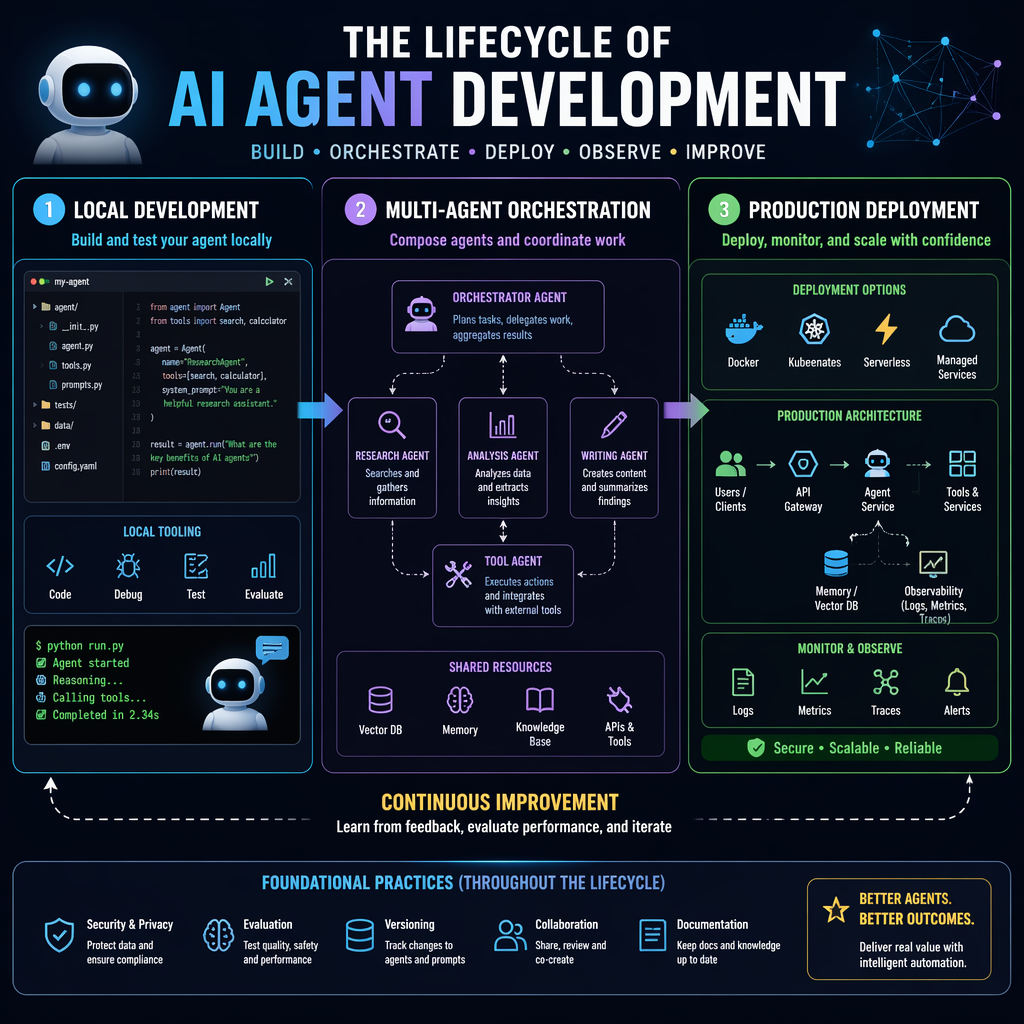
Microsoft has officially launched the v1.0 release of its Agent Framework, alongside the general availability of Foundry Toolkit for Visual Studio Code. These tools aim to streamline the development, composition, and deployment of production-grade AI agents, making the process as structured as traditional software engineering. With features like multi-agent orchestration, memory management, and observability, the framework is designed to address the complexities of building autonomous systems that operate reliably in real-world environments.
Step 1: Local Development with Microsoft Agent Framework and Foundry Toolkit
The journey begins on the developer's machine. Microsoft Agent Framework v1.0 provides a stable SDK and runtime for Python and .NET, integrating the enterprise-grade Semantic Kernel with AutoGen's multi-agent orchestration capabilities. Developers can now build agents that leverage multiple AI models and platforms, including Azure OpenAI, Anthropic, Google Gemini, and Amazon Bedrock. The framework also supports open standards like MCP, A2A, and OpenAPI, ensuring interoperability across diverse systems.
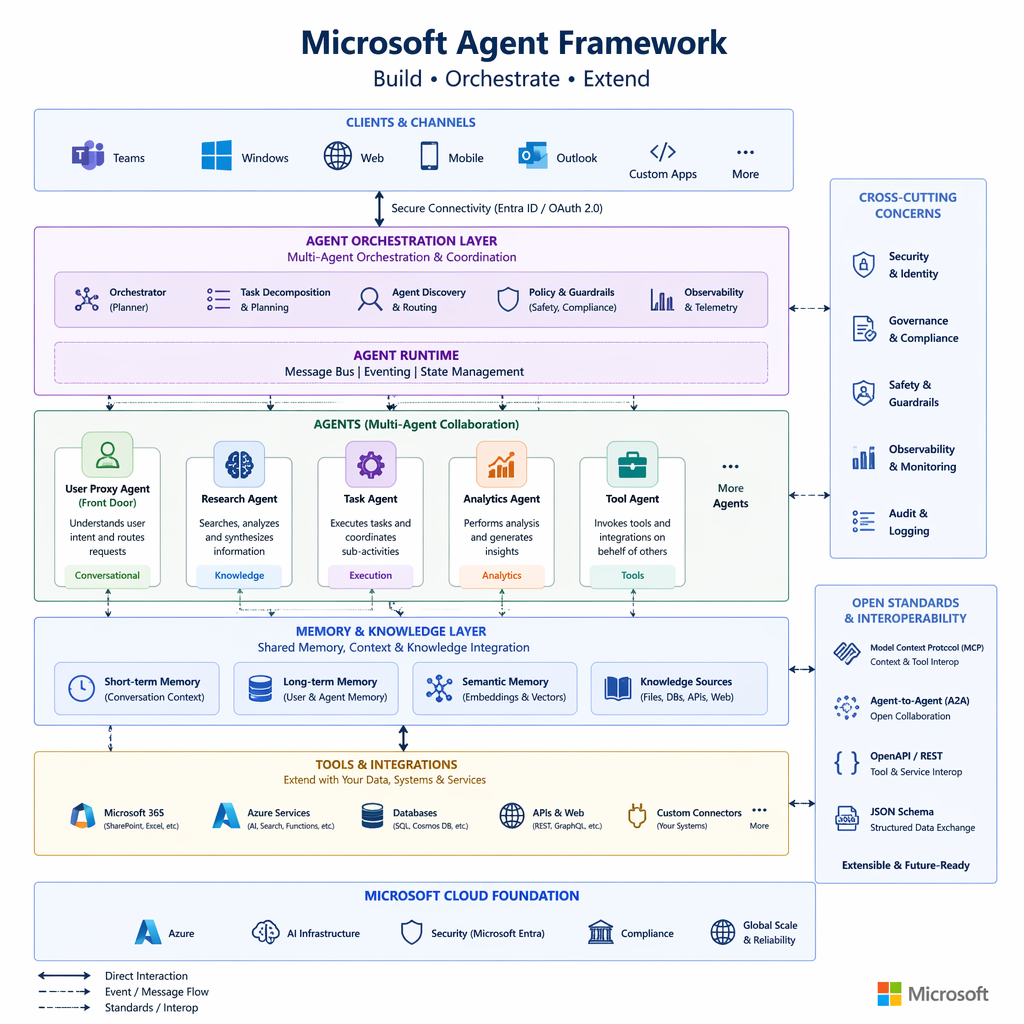
Foundry Toolkit for Visual Studio Code complements the framework by offering a purpose-built development environment. Engineers can create agents using templates or GitHub Copilot, debug runs locally with visualization and traces, and deploy directly to Foundry Agent Service. This integration reduces friction, enabling developers to focus on building functionality rather than managing infrastructure.
Key Takeaways
- Microsoft Agent Framework v1.0 supports multi-model and multi-platform AI integration.
- Foundry Toolkit for Visual Studio Code simplifies agent creation, debugging, and deployment.
- Open standards ensure interoperability and scalability for enterprise applications.
Step 2: Building Functional Agents with Agent Harness and Multi-Agent Composition
Microsoft Agent Framework introduces the Agent Harness, a set of foundational patterns for enabling agents to operate autonomously. These patterns include Local Shell Harness with human-in-the-loop approval, Hosted Shell Harness for sandboxed execution, and Context Compaction for managing conversation history in long-running sessions. These capabilities ensure agents can execute tasks securely and maintain coherence over extended periods.
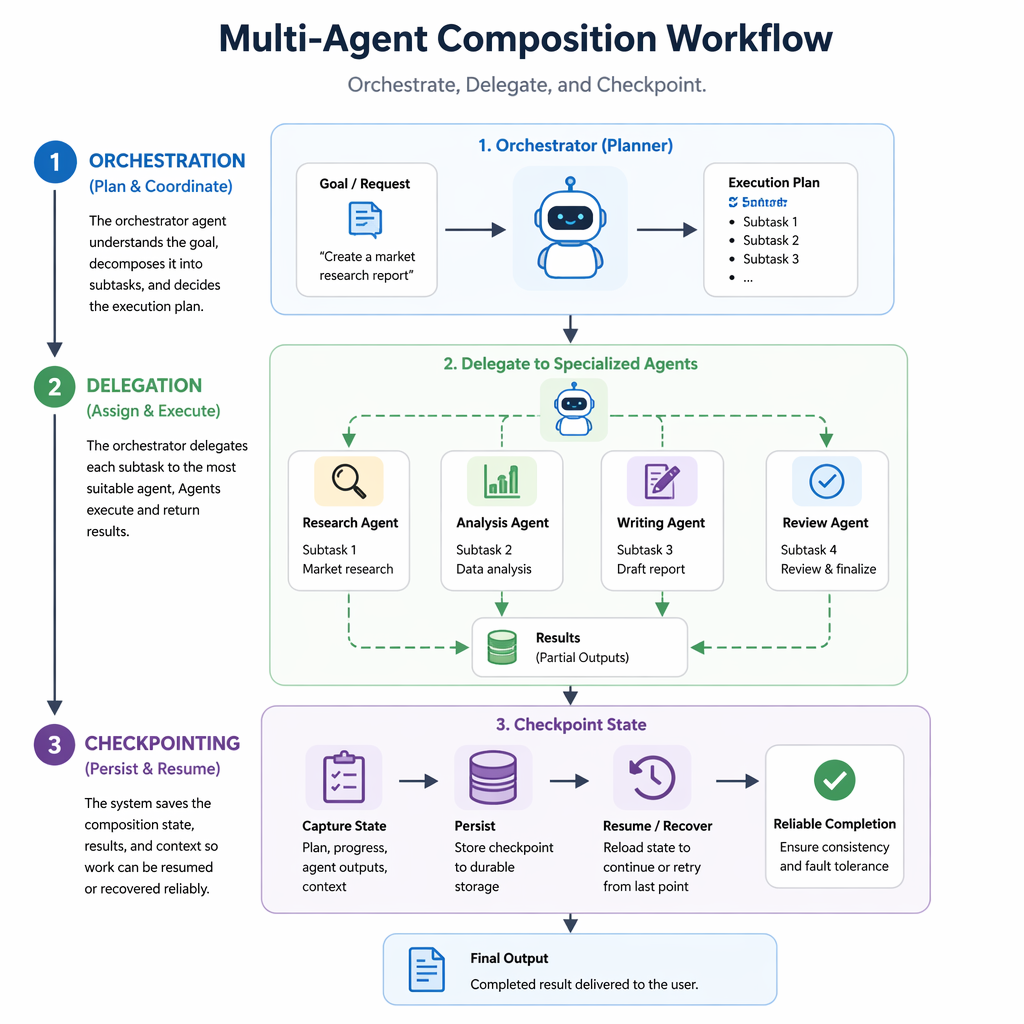
Multi-agent composition is another key feature, allowing developers to orchestrate workflows involving multiple agents. With GitHub Copilot SDK integration, agents can delegate tasks to coding agents that handle shell execution, file operations, and model context management. This modular approach simplifies complex workflows and enhances agent capabilities.
"Microsoft Agent Framework bridges the gap between multi-agent orchestration and autonomous functionality, empowering developers to build agents that truly deliver."
Builder note
Always enable human-in-the-loop approval for sensitive operations like shell execution to mitigate risks and ensure compliance.
Step 3: Enabling Stateful Agents with Foundry Memory
Stateful agents are critical for production environments, where long-term memory is essential for maintaining context and improving decision-making. Foundry's memory capability, now in public preview, integrates directly with Microsoft Agent Framework and LangGraph. This managed memory system eliminates the need for external databases, simplifying provisioning, scaling, and security.
Developers can use Foundry Memory to store and retrieve context seamlessly, enabling agents to adapt to user interactions and maintain coherence across sessions. This feature is particularly useful for customer success agents, collaborative tools, and other applications requiring persistent state.
Source Card
Complete Developer Journey with Microsoft FoundryMicrosoft's latest release simplifies the development and deployment of production-grade AI agents, addressing key challenges like orchestration, memory, and observability.
Microsoft Foundry Blog
| Signal | Why it matters |
|---|---|
| Agent Framework v1.0 | Provides a stable foundation for building multi-agent systems. |
| Foundry Toolkit for VS Code | Streamlines local development and deployment workflows. |
| Agent Harness | Enables autonomous functionality with secure execution patterns. |
| Foundry Memory | Supports stateful agents without external database dependencies. |
- Start with Microsoft Agent Framework to build foundational agent capabilities.
- Use Foundry Toolkit for Visual Studio Code to streamline development and debugging.
- Leverage Agent Harness for secure and autonomous agent operations.
- Integrate Foundry Memory for stateful, context-aware agents.
- Multi-agent orchestration with checkpointing and middleware pipelines.
- Human-in-the-loop approval for sensitive operations.
- Native integration with Foundry tools and services.
- https://devblogs.microsoft.com/foundry/from-local-to-production-the-complete-developer-journey-for-building-composing-and-deploying-ai-agents
Builder implications
For teams evaluating Microsoft Agent Framework v1.0: Engineering AI Agents from Local to Production, the useful question is not whether the announcement sounds important. The useful question is whether it changes how an agent system is built, tested, operated, or bought. The source from devblogs.microsoft.com gives builders a concrete signal to inspect: Complete Developer Journey with Microsoft Foundry | Microsoft Foundry Blog. That signal should be mapped against the parts of an agent stack that usually become fragile first, including tool contracts, long-running state, evaluation coverage, cost visibility, failure recovery, and the handoff between prototype code and production operations.
Production lens
Treat this as a systems decision, not a headline decision. A builder should ask how the change affects the agent loop, what needs to be measured, which failure modes become easier to catch, and whether the team can explain the behavior to a customer or operator when something goes wrong. If the answer is vague, the technology may still be useful, but it is not yet a production advantage.
Adoption checklist
- Identify the workflow where Microsoft Agent Framework, Foundry Toolkit, AI agent development, multi-agent orchestration already creates measurable pain, such as slow triage, brittle handoffs, unclear ownership, or poor observability.
- Write down the current baseline before changing the stack: latency, cost per run, recovery rate, review time, and the percentage of tasks that need human correction.
- Prototype against a real internal workflow instead of a demo task. The workflow should include imperfect inputs, missing context, tool failures, and at least one approval step.
- Add traces, event logs, and evaluation checkpoints before expanding usage. A new framework or model is hard to judge when the team cannot see where the agent made its decision.
- Keep rollback boring. The first version should let an operator pause automation, inspect the last decision, and return control to a human without losing state.
- Review the source again after testing. The source-backed claim should line up with observed behavior in your own environment, not just with launch copy or release notes.
| Area | Question | Practical test |
|---|---|---|
| Reliability | Does the agent fail in a way operators can understand? | Run the same task with missing data, stale data, and a tool timeout. |
| Observability | Can the team reconstruct why a decision happened? | Inspect traces for inputs, tool calls, model outputs, approvals, and final state. |
| Cost | Does value scale faster than usage cost? | Compare cost per successful task against the old human or scripted workflow. |
| Governance | Can sensitive actions be reviewed or blocked? | Require approval on high-impact actions and log who approved the step. |
What to watch next
The next signal to watch is whether builders start publishing implementation notes, migration stories, benchmarks, or reliability reports around this source. That secondary evidence matters because agent infrastructure often looks clean at release time and only shows its real shape once teams connect it to messy business workflows. Strong follow-on evidence would include reproducible examples, clear limits, documented failure recovery, and customer stories that describe what changed in the operating model.
Key Takeaways
- Do not treat a release as automatically production-ready because it comes from a strong source.
- Use the source as a reason to test a specific workflow, not as a reason to rewrite the entire stack.
- The best early signal is not novelty. It is whether the system becomes easier to observe, recover, and improve.