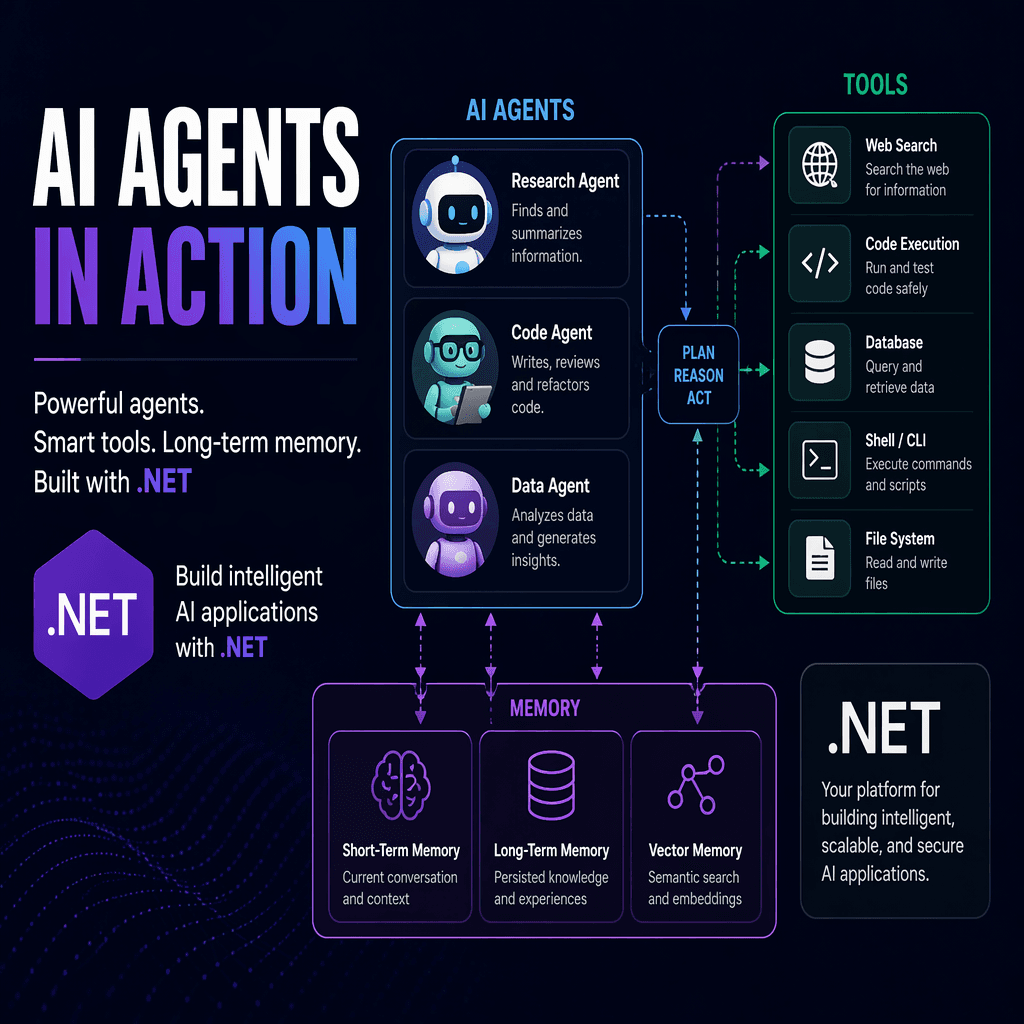
The Microsoft Agent Framework has emerged as a powerful SDK for engineers and founders looking to build intelligent AI agents in .NET. Released as part of Microsoft's broader AI tooling ecosystem, this framework enables developers to create agents capable of reasoning, tool usage, memory retention, and multi-turn conversations. This article dives into the framework's capabilities, practical applications, and engineering tradeoffs.
What Makes an AI Agent Different?
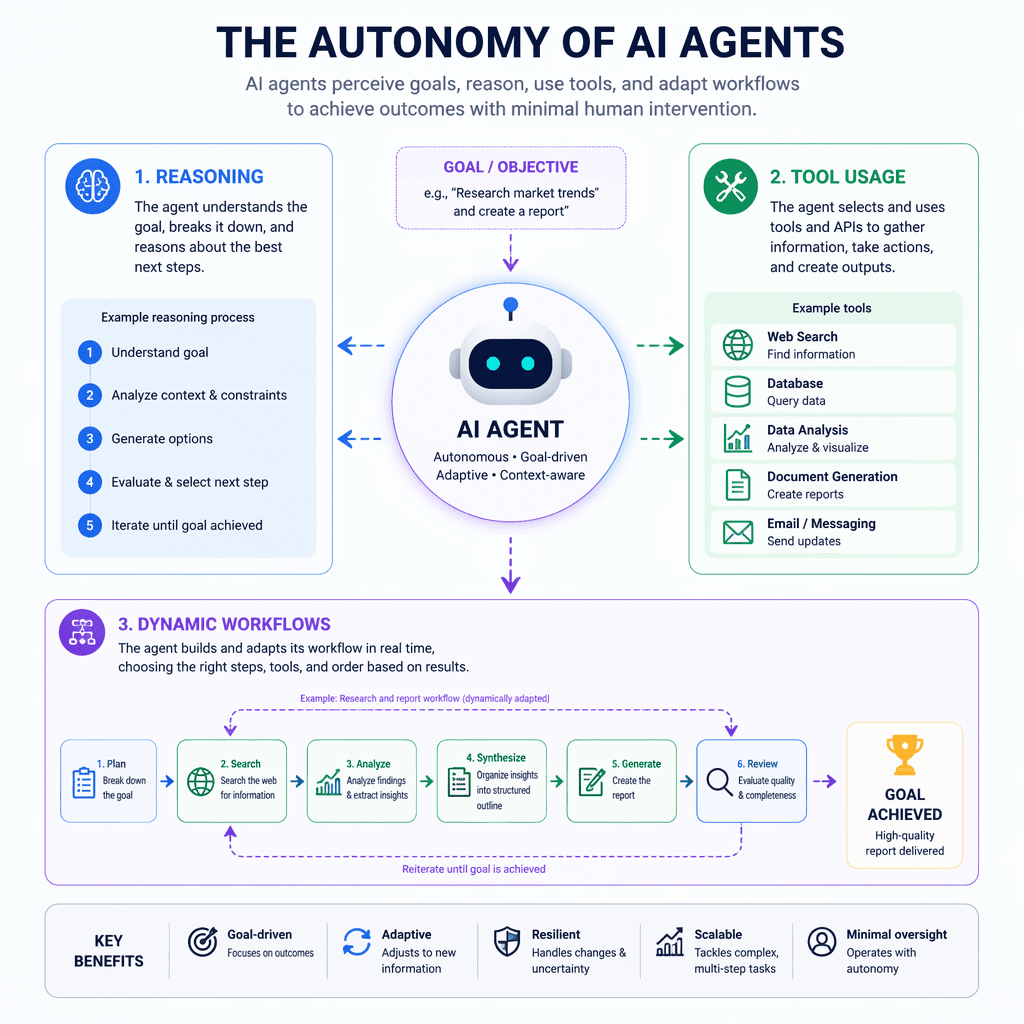
Unlike traditional chatbots that simply pass input to a model and return output, AI agents possess autonomy. They can reason about tasks, decide which tools to use, evaluate results, and adapt their workflows dynamically. This autonomy allows agents to handle complex scenarios without requiring explicit step-by-step instructions for every possible interaction.
Key Takeaways
- AI agents extend beyond chatbots by incorporating reasoning and tool usage.
- The Microsoft Agent Framework builds on MEAI and VectorData for seamless integration.
- Agents can manage sessions, memory, and multi-agent workflows.
Think of an AI agent as handing a colleague a to-do list and letting them figure out how to get it done.
Builder note
The Microsoft Agent Framework is designed for production-ready applications, supporting Azure OpenAI, OpenAI, GitHub Models, and local models like Foundry Local or Ollama.
Source Card
Microsoft Agent Framework - Building Blocks for AI Part 3This source provides an overview of the Microsoft Agent Framework's capabilities, including tools, memory, and multi-turn conversations.
Microsoft DevBlogs
Getting Started with the Framework
To begin, install the Microsoft Agent Framework package in your .NET project. The framework builds directly on top of `IChatClient`, making it compatible with MEAI abstractions. Engineers can create agents using the `.AsAIAgent()` extension method, which bridges the provider's SDK to the agent abstraction.
| Signal | Why it matters |
|---|---|
| Autonomy | Enables agents to reason and adapt dynamically. |
| Tool Integration | Allows agents to use external functions for enhanced capabilities. |
| Session Management | Preserves context across multi-turn conversations. |
| Memory Retention | Supports long-term user-specific data storage. |
Enhancing Agents with Tools
Tools are functions that the agent can call based on user requests. Using the `AIFunctionFactory` from MEAI, developers can define tools with descriptive attributes that guide the model's decision-making. For example, a weather tool can provide real-time updates without requiring explicit logic for every user query.
- Tools are defined using `AIFunctionFactory`.
- Descriptive attributes help the model understand tool functionality.
- Agents can dynamically decide when and how to use tools.
Managing Multi-Turn Conversations
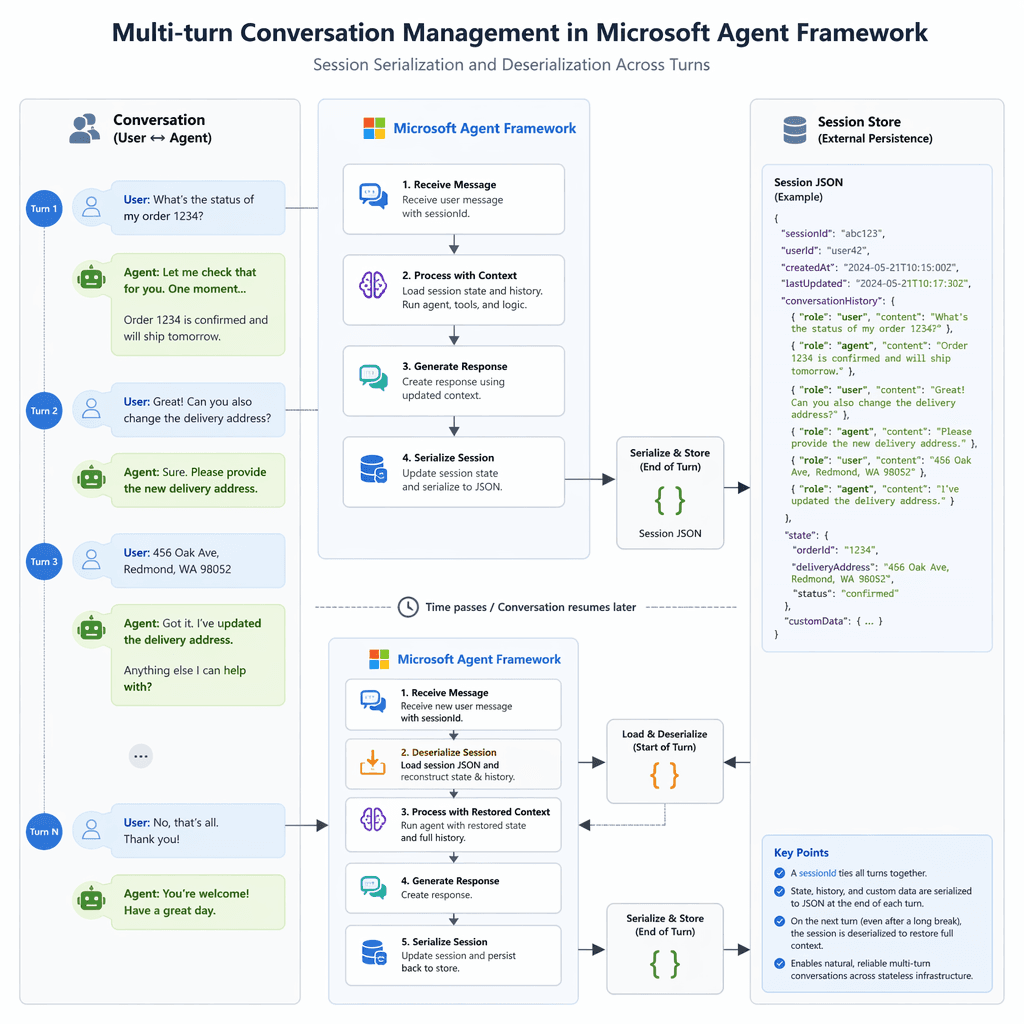
Multi-turn conversations are essential for real-world applications. The framework's `AgentSession` feature allows agents to maintain context across exchanges. Sessions can also be serialized and deserialized, enabling stateless service deployments where context needs to be preserved between user interactions.
- Create a session using `agent.CreateSessionAsync()`.
- Run queries while maintaining session context.
- Serialize session state for stateless service integration.
- Restore session state using `DeserializeSessionAsync()`.
Implementing Memory for Long-Term Context
The `AIContextProvider` feature enables agents to retain long-term memory, such as user preferences or past interactions. This is particularly useful for applications requiring personalization or continuity across sessions. Developers can define custom memory providers to store and retrieve user-specific data.
Builder note
Memory retention is critical for applications like customer support, where agents need to recall user preferences or previous issues.
Adoption Risks and Tradeoffs
While the Microsoft Agent Framework offers robust capabilities, adopting it requires careful consideration of tradeoffs. Engineers must ensure proper tool descriptions to avoid misuse by the model. Additionally, memory retention introduces privacy concerns, necessitating secure storage and compliance with data regulations.
- https://devblogs.microsoft.com/dotnet/microsoft-agent-framework-building-blocks-for-ai-part-3
- https://github.com/microsoft/agent-framework
Builder implications
For teams evaluating Microsoft Agent Framework: Engineering AI Agents in .NET, the useful question is not whether the announcement sounds important. The useful question is whether it changes how an agent system is built, tested, operated, or bought. The source from devblogs.microsoft.com gives builders a concrete signal to inspect: Microsoft Agent Framework - Building Blocks for AI Part 3. That signal should be mapped against the parts of an agent stack that usually become fragile first, including tool contracts, long-running state, evaluation coverage, cost visibility, failure recovery, and the handoff between prototype code and production operations.
Production lens
Treat this as a systems decision, not a headline decision. A builder should ask how the change affects the agent loop, what needs to be measured, which failure modes become easier to catch, and whether the team can explain the behavior to a customer or operator when something goes wrong. If the answer is vague, the technology may still be useful, but it is not yet a production advantage.
Adoption checklist
- Identify the workflow where AI agents, Microsoft Agent Framework, .NET AI tools, multi-turn conversations already creates measurable pain, such as slow triage, brittle handoffs, unclear ownership, or poor observability.
- Write down the current baseline before changing the stack: latency, cost per run, recovery rate, review time, and the percentage of tasks that need human correction.
- Prototype against a real internal workflow instead of a demo task. The workflow should include imperfect inputs, missing context, tool failures, and at least one approval step.
- Add traces, event logs, and evaluation checkpoints before expanding usage. A new framework or model is hard to judge when the team cannot see where the agent made its decision.
- Keep rollback boring. The first version should let an operator pause automation, inspect the last decision, and return control to a human without losing state.
- Review the source again after testing. The source-backed claim should line up with observed behavior in your own environment, not just with launch copy or release notes.
| Area | Question | Practical test |
|---|---|---|
| Reliability | Does the agent fail in a way operators can understand? | Run the same task with missing data, stale data, and a tool timeout. |
| Observability | Can the team reconstruct why a decision happened? | Inspect traces for inputs, tool calls, model outputs, approvals, and final state. |
| Cost | Does value scale faster than usage cost? | Compare cost per successful task against the old human or scripted workflow. |
| Governance | Can sensitive actions be reviewed or blocked? | Require approval on high-impact actions and log who approved the step. |
What to watch next
The next signal to watch is whether builders start publishing implementation notes, migration stories, benchmarks, or reliability reports around this source. That secondary evidence matters because agent infrastructure often looks clean at release time and only shows its real shape once teams connect it to messy business workflows. Strong follow-on evidence would include reproducible examples, clear limits, documented failure recovery, and customer stories that describe what changed in the operating model.
Key Takeaways
- Do not treat a release as automatically production-ready because it comes from a strong source.
- Use the source as a reason to test a specific workflow, not as a reason to rewrite the entire stack.
- The best early signal is not novelty. It is whether the system becomes easier to observe, recover, and improve.