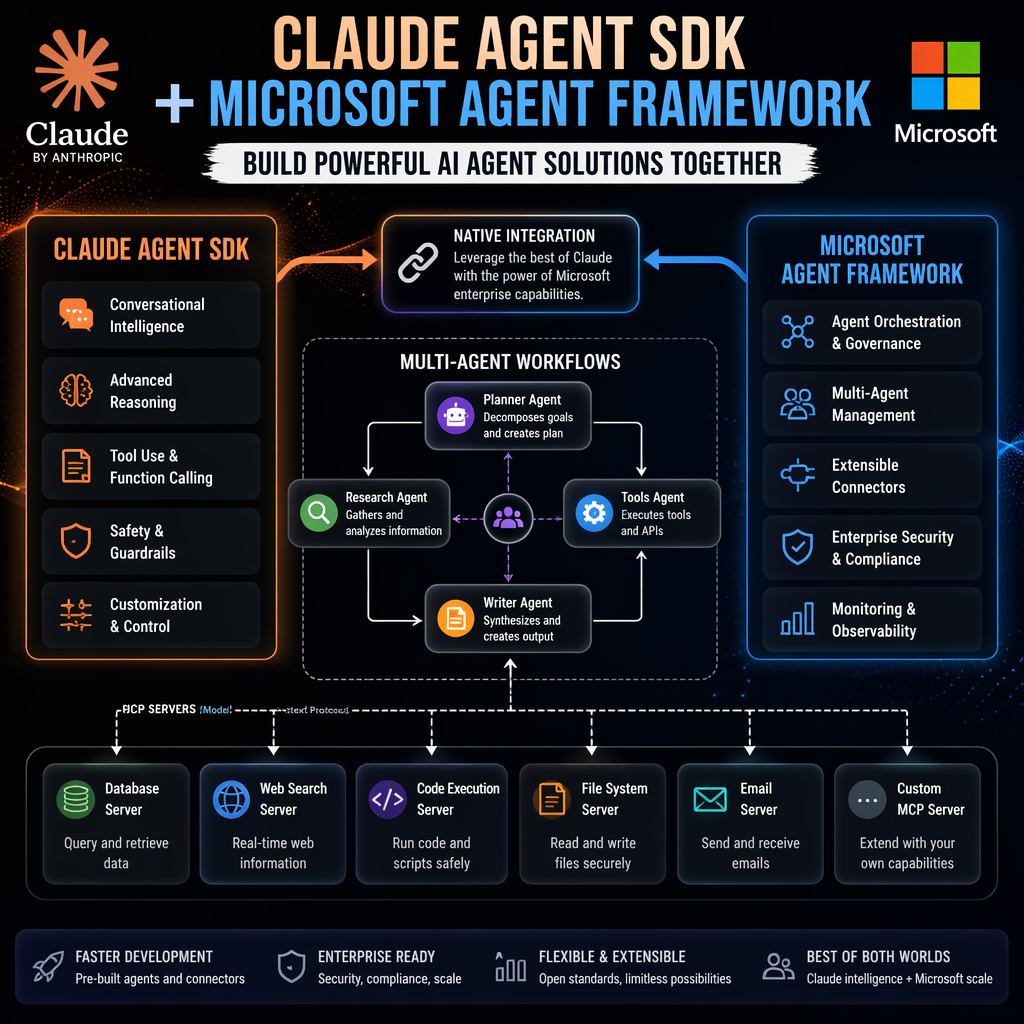
The integration of Microsoft Agent Framework with the Claude Agent SDK marks a significant milestone for engineers and founders building AI agents. This collaboration combines the consistent abstraction of the Agent Framework with Claude's robust agentic capabilities, including file editing, code execution, function calling, streaming responses, multi-turn conversations, and Model Context Protocol (MCP) server integration. The result is a highly versatile toolkit for creating sophisticated AI systems.
Why Choose Microsoft Agent Framework with Claude Agent SDK?
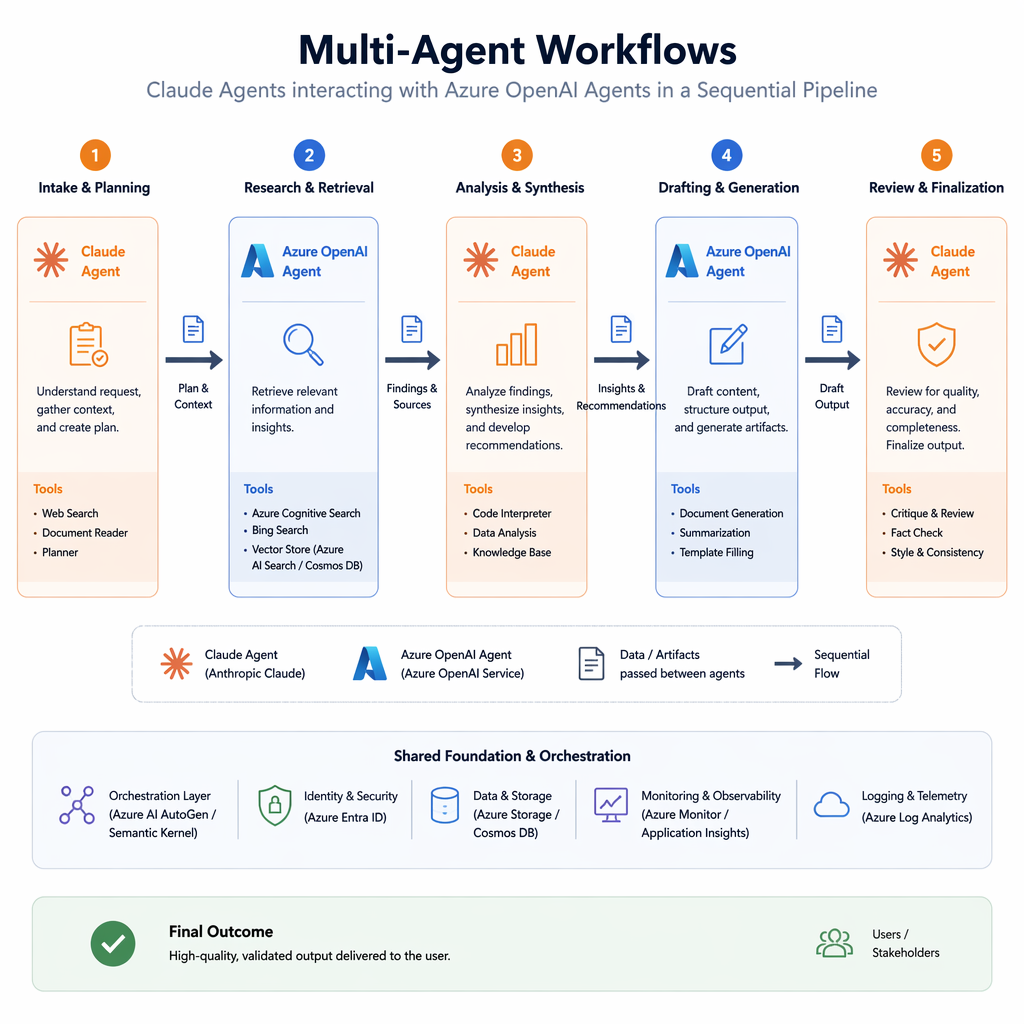
While the Claude Agent SDK can be used independently, integrating it with Microsoft Agent Framework offers unique advantages. The framework provides a consistent `BaseAgent` interface, enabling seamless switching between providers without restructuring code. It also supports multi-agent workflows, allowing engineers to compose Claude agents with other providers like Azure OpenAI, OpenAI, and GitHub Copilot. Additionally, the ecosystem integration includes declarative agent definitions, A2A protocol support, and standardized patterns for tools, sessions, and streaming.
Key Takeaways
- Consistent agent abstraction simplifies provider switching.
- Multi-agent workflows enable complex orchestration.
- Ecosystem integration enhances functionality and scalability.
Agent Framework lets you treat Claude as one building block in a larger agentic system rather than a standalone tool.
Getting Started: Installation and Basic Setup
To begin, install the Claude Agent SDK integration using Python. The package is available via pip and supports pre-release versions for early adopters. Once installed, creating a Claude agent is straightforward. Engineers can define instructions for the agent and interact with it using an async context manager pattern.
Builder note
Use the async context manager pattern to ensure proper resource management when interacting with Claude agents.
Leveraging Built-in Tools and Custom Functionality
Claude Agent SDK includes built-in tools for file operations, shell commands, and more. Engineers can enable these tools by passing their names as strings during agent initialization. For domain-specific needs, custom function tools can be added to extend the agent's capabilities. This flexibility allows builders to tailor agents to specific workflows and industries.
| Signal | Why it matters |
|---|---|
| Built-in tools | Enable quick access to common operations like file editing and shell commands. |
| Custom function tools | Allow domain-specific extensions for specialized workflows. |
Enhancing User Experience with Streaming and Multi-Turn Conversations
Streaming responses improve user experience by delivering output incrementally as it is generated. This feature is particularly useful for long-running tasks or conversational agents. Additionally, the SDK supports multi-turn conversations, maintaining context across interactions. Engineers can use threads to manage session resumption, ensuring continuity in user-agent dialogues.
Advanced Features: Permission Modes and MCP Integration
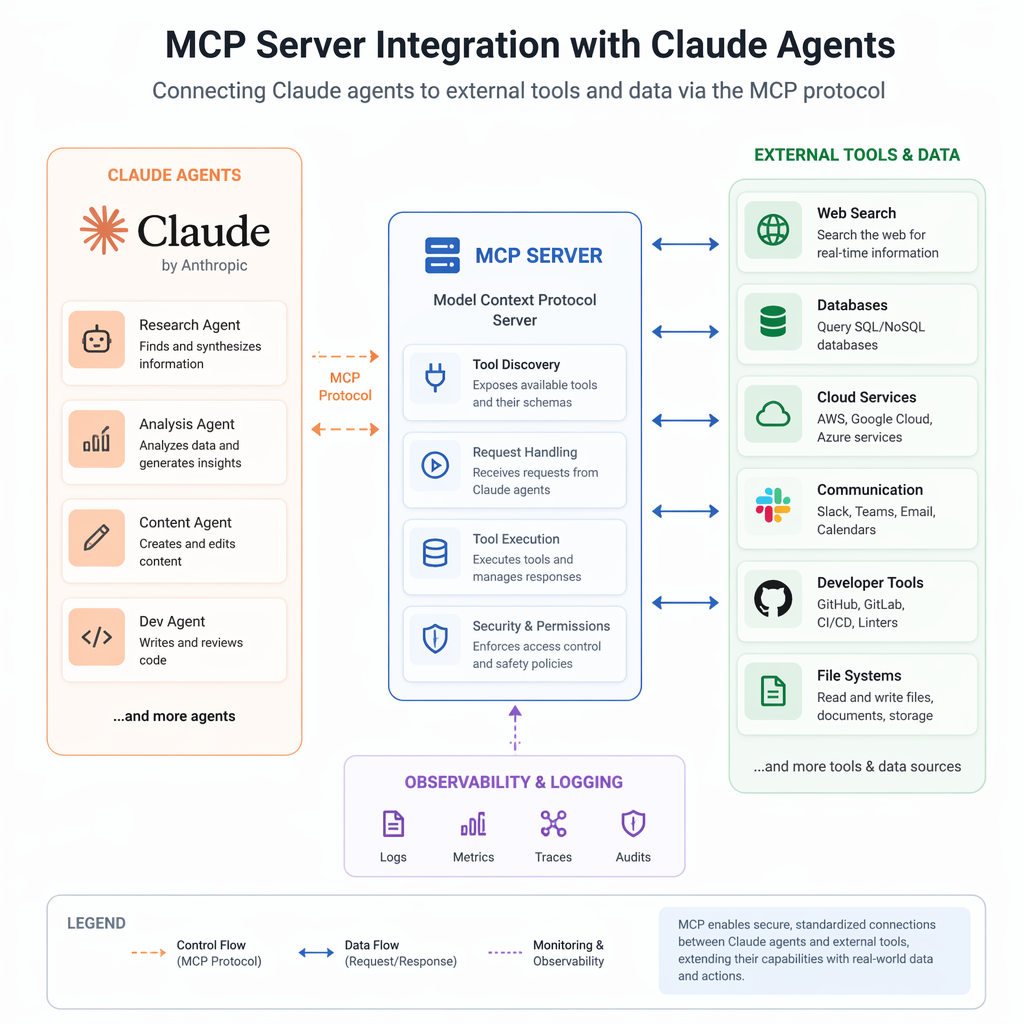
Permission modes allow engineers to control how agents handle file operations and command execution. For example, auto-accept modes can streamline workflows by reducing manual approvals. MCP server integration further expands agent capabilities by connecting to external tools and data sources, enabling more complex operations and data-driven insights.
Multi-Agent Workflows: Combining Claude with Other Providers
One of the standout features of Microsoft Agent Framework is its support for multi-agent workflows. Engineers can orchestrate agents from different providers in sequential, concurrent, handoff, or group chat workflows. For instance, a Claude agent can review outputs generated by an Azure OpenAI agent, creating a collaborative pipeline for tasks like content creation or code review.
- Define agents with specific roles and instructions.
- Use workflow builders to compose multi-agent pipelines.
- Run workflows asynchronously for efficient execution.
Source Card
Build AI Agents with Claude Agent SDK and Microsoft Agent FrameworkThis integration simplifies the creation of versatile AI agents by combining Claude's advanced capabilities with Microsoft Agent Framework's consistent abstraction and ecosystem support.
Microsoft DevBlogs
- Stream responses for real-time feedback.
- Maintain context in multi-turn conversations.
- Integrate external tools via MCP servers.
- https://github.com/anthropics/claude-agent-sdk-python
- https://github.com/microsoft/agent-framework
- https://learn.microsoft.com/agent-framework/tutorials/overview
Builder implications
For teams evaluating Building AI Agents with Claude Agent SDK and Microsoft Agent Framework, the useful question is not whether the announcement sounds important. The useful question is whether it changes how an agent system is built, tested, operated, or bought. The source from devblogs.microsoft.com gives builders a concrete signal to inspect: Build AI Agents with Claude Agent SDK and Microsoft Agent Framework. That signal should be mapped against the parts of an agent stack that usually become fragile first, including tool contracts, long-running state, evaluation coverage, cost visibility, failure recovery, and the handoff between prototype code and production operations.
Production lens
Treat this as a systems decision, not a headline decision. A builder should ask how the change affects the agent loop, what needs to be measured, which failure modes become easier to catch, and whether the team can explain the behavior to a customer or operator when something goes wrong. If the answer is vague, the technology may still be useful, but it is not yet a production advantage.
Adoption checklist
- Identify the workflow where Claude Agent SDK, Microsoft Agent Framework, Multi-Agent Workflows, AI Engineering already creates measurable pain, such as slow triage, brittle handoffs, unclear ownership, or poor observability.
- Write down the current baseline before changing the stack: latency, cost per run, recovery rate, review time, and the percentage of tasks that need human correction.
- Prototype against a real internal workflow instead of a demo task. The workflow should include imperfect inputs, missing context, tool failures, and at least one approval step.
- Add traces, event logs, and evaluation checkpoints before expanding usage. A new framework or model is hard to judge when the team cannot see where the agent made its decision.
- Keep rollback boring. The first version should let an operator pause automation, inspect the last decision, and return control to a human without losing state.
- Review the source again after testing. The source-backed claim should line up with observed behavior in your own environment, not just with launch copy or release notes.
| Area | Question | Practical test |
|---|---|---|
| Reliability | Does the agent fail in a way operators can understand? | Run the same task with missing data, stale data, and a tool timeout. |
| Observability | Can the team reconstruct why a decision happened? | Inspect traces for inputs, tool calls, model outputs, approvals, and final state. |
| Cost | Does value scale faster than usage cost? | Compare cost per successful task against the old human or scripted workflow. |
| Governance | Can sensitive actions be reviewed or blocked? | Require approval on high-impact actions and log who approved the step. |
What to watch next
The next signal to watch is whether builders start publishing implementation notes, migration stories, benchmarks, or reliability reports around this source. That secondary evidence matters because agent infrastructure often looks clean at release time and only shows its real shape once teams connect it to messy business workflows. Strong follow-on evidence would include reproducible examples, clear limits, documented failure recovery, and customer stories that describe what changed in the operating model.
Key Takeaways
- Do not treat a release as automatically production-ready because it comes from a strong source.
- Use the source as a reason to test a specific workflow, not as a reason to rewrite the entire stack.
- The best early signal is not novelty. It is whether the system becomes easier to observe, recover, and improve.